
Does Turning Your AC Off During the Workday Actually Save Money in Mountain View?
The 5 PM Sweltering House Dilemma
A persistent myth among homeowners is that completely shutting down your cooling system while you are away is the ultimate efficiency hack, but does turning your AC off during the workday actually save money in Mountain View? The short answer is no. While it seems logical to stop cooling an empty house, the reality of thermodynamics means that forcing your system to recover from extreme heat later in the day often consumes significantly more energy than maintaining a moderate temperature. If you find yourself needing air conditioning services or reliable AC maintenance in Mountain View, understanding this daily operational balance is the first step toward better system performance.
At Plum HVAC, our technicians see this pattern constantly during the late August and back-to-school transition. Families adjust their schedules, the house sits empty from morning until late afternoon, and the thermostat gets switched completely off. At 5 PM, everyone returns to a sweltering indoor environment that feels closer to an oven than a living space. The immediate reaction is to crank the thermostat down to 65 degrees in hopes of rapidly chilling the rooms.
The problem with the 5 PM override: When a house sits completely unconditioned during the hottest part of the day, the indoor temperature climbs steadily. By the time the system is turned back on, it is no longer just cooling the air. It is battling hours of accumulated heat. The decision point for most homeowners comes down to comparing a full system shut-off against a strategic, moderate temperature setback. Choosing the latter prevents the extreme discomfort of a hot house while actually protecting your equipment from the grueling, high-capacity catch-up cycles that drive up utility usage.
Understanding Thermal Mass: Why Cooling a Hot House Takes So Long
The Problem: Lingering Heat After the AC Turns On
During our late-summer service calls, we frequently hear Mountain View homeowners describe a frustrating phenomenon: after turning the AC back on at 5 PM, the air blowing from the vents feels cold, yet the house itself remains uncomfortably warm for hours. You might sit on the couch and feel heat radiating through your clothes, or notice that the kitchen cabinets are physically warm to the touch. This happens because your air conditioner is fighting a hidden battle against something called thermal mass.
The Cause: Heat Absorption in Physical Objects
Thermal mass refers to the ability of heavy, physical materials in your home to absorb, store, and release heat. Throughout a hot workday with the AC turned off, the ambient air temperature rises, but so does the temperature of everything inside the house. Your drywall, hardwood flooring, furniture, cabinetry, and even your mattress soak up the heat like a sponge.
While an air conditioning system can cool the ambient air relatively quickly—often within 30 to 45 minutes—extracting deep-seated heat from physical objects takes hours of continuous, heavy-duty operation. The cold air must slowly draw the trapped heat out of the thermal mass. If you want to understand more about how AC units perform in Bay Area homes, recognizing the impact of thermal mass is essential. The physical structure of your house acts as a thermal battery, and when it is fully charged with afternoon heat, your AC has to work overtime to drain it.
The Solution: Preventing Deep Heat Penetration
The most effective way to manage thermal mass is to prevent it from overheating in the first place. By maintaining a moderate indoor temperature throughout the day, you stop the heat from deeply penetrating your furniture and walls. The energy required to maintain this baseline temperature is surprisingly low compared to the massive energy spike needed to extract heat from a fully baked home. Keeping a steady, moderate climate ensures that when you do lower the thermostat in the evening, the system only has to cool the air, allowing your home to reach a comfortable state much faster.
The Hidden Costs of a Complete System Shut-Off
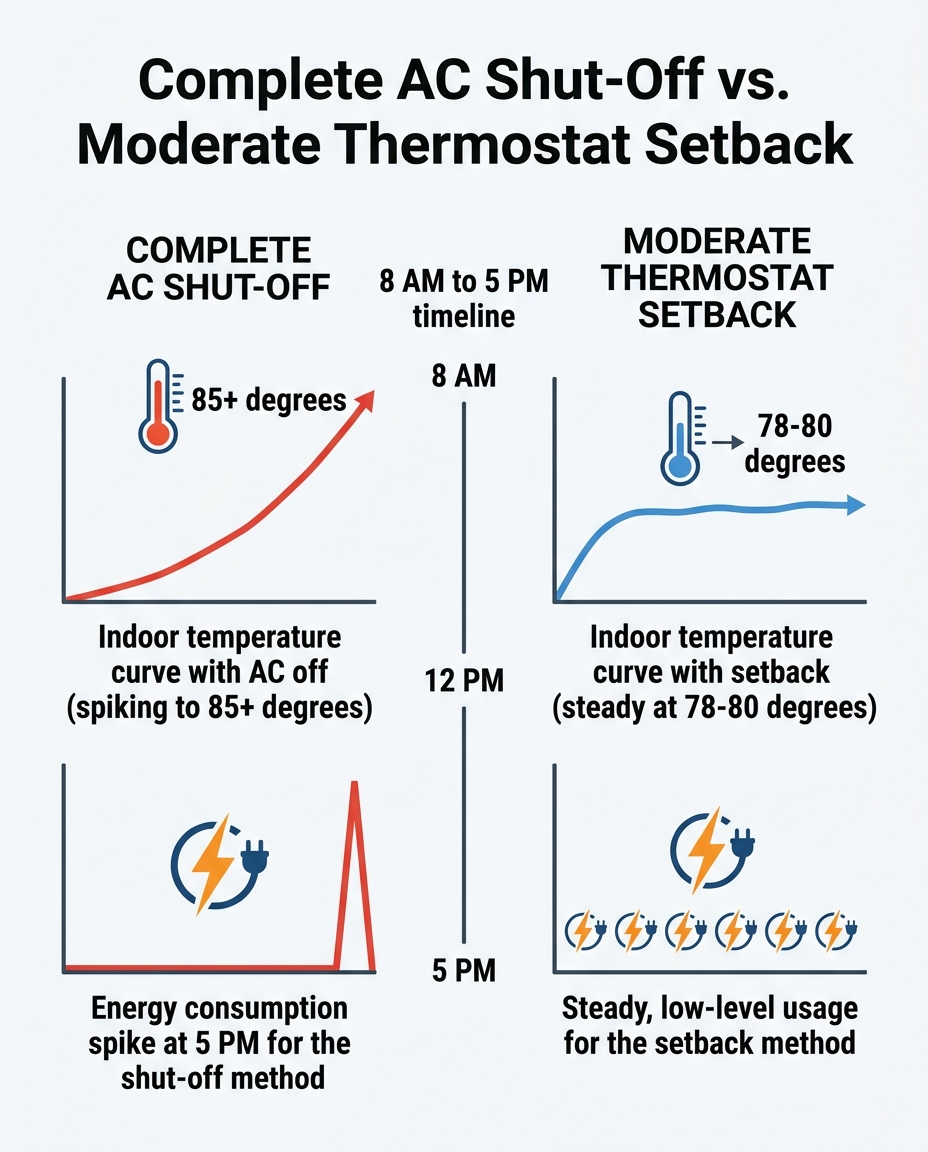
Turning the system completely off might stop the meter from spinning during the middle of the day, but the hidden costs of this habit quickly offset any perceived savings. The most significant hidden cost is the excessive wear and tear on your HVAC components. Air conditioners are designed to run in cycles, maintaining a relatively stable environment. When a system is forced to run non-stop for three to four hours to recover from extreme indoor temperatures, the compressor and blower motor endure immense strain.
Continuous high-capacity running generates excess heat within the equipment itself. Over time, this daily marathon can degrade internal components. In fact, our Plum HVAC repair crews frequently replace burned-out compressors years before their expected lifespan simply because of chronic overexertion. What you might save in daily energy consumption is easily lost when a major component requires early replacement due to this unnecessary wear and tear.
Furthermore, complete shut-offs eliminate your home's primary defense against humidity. An air conditioner does two jobs: it lowers the temperature, and it extracts moisture from the air. When the system sits idle all day, humidity builds up alongside the heat. A warm, damp environment feels far more uncomfortable than a warm, dry one, and it creates ideal conditions for mold and mildew to develop in dark spaces. Maintaining a 78-80 degree setback temperature keeps air circulating and allows the system to periodically cycle on, removing excess moisture before it becomes a problem.
• Complete Shut-Off — Impact on Equipment: High strain on compressor during evening catch-up — Humidity Control: Poor; moisture builds up unchecked all day — Energy Consumption Profile: Zero mid-day, massive prolonged spike at 5 PM
• Moderate Setback — Impact on Equipment: Low strain; system cycles normally — Humidity Control: Excellent; periodic cycling removes humidity — Energy Consumption Profile: Low, steady mid-day usage, minor bump at 5 PM
Ultimately, the massive effort required to cool a hot, humid house back down often consumes as much—if not more—energy than simply letting the system run on a highly efficient setback schedule.

The Ideal Thermostat Setback Strategy for Maximum Efficiency
Finding the right balance between efficiency and comfort does not require guesswork. The U.S. Department of Energy provides clear recommendations for managing an empty house during the cooling season. Rather than a full shut-off, they advise using a 7-10 degree setback from your normal comfort setting for periods of 8 hours or more.
For most households, the ideal strategy is setting a 78-80 degree setback temperature while the house is unoccupied. This specific range is warm enough to significantly reduce the number of times the air conditioner cycles on during the day, yet cool enough to prevent the home's thermal mass from absorbing deep, stubborn heat. By holding the line at 80 degrees, your system prevents the extreme temperature and humidity spikes that make evening recovery so difficult, ensuring that returning the house to 72 degrees takes minimal time and effort.
To implement this highly efficient strategy, we recommend our customers follow these everyday best practices:
• Determine your baseline: Identify your preferred evening comfort temperature (e.g., 72 degrees).
• Calculate the setback: Add 7 to 8 degrees to your baseline to find your ideal away temperature (e.g., 79 degrees).
• Automate the schedule: Use a programmable thermostat to initiate the setback temperature 15 minutes before you typically leave the house.
• Keep interior doors open: Ensure air can flow freely through the house, preventing isolated hot spots from forming in closed-off rooms.
• Manage window coverings: Close blinds and curtains on east and west-facing windows to block radiant heat before you leave for the day.
How Silicon Valley Afternoon Sun Amplifies Heat Gain
Generic national energy advice often fails to account for regional weather patterns, which is why localized strategies are so critical. In our region, the climate plays a massive role in how quickly a home heats up. Mountain View experiences warm, sunny summer afternoons that cause significant radiant heat gain, making it incredibly energy-intensive to cool a hot house from scratch at 5 PM.
The impact of solar radiation: As the sun moves westward in the late afternoon, its intense rays strike the side of your home at a lower, more direct angle. West-facing rooms bear the brunt of this solar radiation. The heat transfers through window glass and warms the interior surfaces instantly. If the air conditioning is entirely off, this radiant heat rapidly accelerates the warming of the home's thermal mass. A room can jump several degrees in a matter of minutes under direct late-summer sunlight.
Maintaining a moderate baseline temperature helps combat this localized rapid heat gain. When the system is allowed to cycle on at 79 or 80 degrees, it intercepts that solar heat before it can fully bake into the floors and furniture. As a team that has spent years working in Silicon Valley climates, Plum HVAC knows firsthand that our unique afternoon sun patterns require a tailored approach. Relying on a complete shut-off in the Mountain View HVAC service area simply leaves your home defenseless against the most intense heat of the day.
Aligning Your HVAC Schedule with the Back-to-School Transition
Household schedules rarely remain static throughout the year. The late August / back-to-school transition brings a dramatic shift in how homes are occupied. During mid-summer, houses are often bustling with activity throughout the day, requiring a steady, comfortable temperature. However, as school resumes and regular work commutes return, homes suddenly sit empty from 8 AM to 4 or 5 PM.
This empty period aligns exactly with the peak afternoon heat, creating the perfect storm for thermal mass absorption if the thermostat is neglected. We always advise our customers that managing this transition effectively requires automation, so your energy efficiency isn't dependent on remembering to adjust the dial during a chaotic morning rush.
1. Upgrade to automation: Install a programmable or smart thermostat. These devices allow you to set specific schedules that align with your family's routine, ensuring the system automatically enters setback mode the moment the house empties.
2. Program the departure time: Set the thermostat to shift to your 78-80 degree setback temperature exactly when the last person leaves the house.
3. Design a gradual recovery period: Instead of a manual 5 PM override, program the thermostat to begin cooling the home 30 to 45 minutes before the first person arrives.
4. Let the system do the work: By starting the recovery process early, the system can cool the home gradually, avoiding the harsh, high-speed strain of a sudden temperature drop.
Preventing System Overload During Peak Cooling Hours
The Problem: Struggling Through the Afternoon Catch-Up
Even with a proper setback strategy and a smart recovery schedule, late afternoon cooling demands a lot from your equipment. The transition from an 80-degree setback down to a 72-degree comfort setting still requires the system to operate at peak efficiency during the hottest part of the day in Mountain View. If the equipment is compromised in any way, it will struggle to bridge that gap, resulting in long run times, lukewarm air, and a house that refuses to cool down.
The Cause: Neglected Upkeep and Hidden Inefficiencies
A system operating with dirty filters, low refrigerant levels, or neglected condenser coils is already working at a severe disadvantage. A clogged air filter restricts airflow, forcing the blower motor to work twice as hard just to push air through the ducts. Dirty outdoor coils act like an insulating blanket, preventing the system from releasing the heat it absorbed from your home. When these issues are present, they force the system to work harder and run longer, completely negating any energy savings you gained from your workday thermostat adjustments.
The Solution: Proactive System Care
In our experience, the absolute best defense against afternoon system overload is proactive, professional care. Ensuring your equipment is clean, calibrated, and properly charged allows it to handle the transition from the setback temperature to the evening comfort setting with ease. A well-maintained system cools faster, dehumidifies better, and uses less electricity to get the job done. By enrolling in a preventative maintenance plan, you keep the equipment running smoothly through the hottest parts of the year, ensuring that your efficiency strategies actually translate into real-world performance.
Frequently Asked Questions
Does it take more energy to cool a hot house or keep it cool?
It generally takes more energy to cool a completely hot house due to the heat absorbed by furniture and walls. Maintaining a moderate setback temperature prevents this deep heat absorption, allowing the system to use less total energy over the course of the day.
Should I turn my AC off when I go to work?
No, completely turning off the system allows extreme heat and humidity to build up indoors. It is much more efficient to set the thermostat back by 7 to 10 degrees, which protects your home without overworking the equipment later.
What temperature should I set my AC when away in summer?
The Department of Energy recommends a setting of 78 to 80 degrees when the house is unoccupied for 8 hours or more. This prevents excessive thermal mass heating while keeping cooling costs manageable.
Is it better to leave the AC fan on auto or on all day?
You should almost always leave the fan set to "Auto." Setting it to "On" forces the blower motor to run continuously, which uses unnecessary electricity and can pull humidity back into the home from the evaporator coil.
How does thermal mass affect my home's cooling efficiency?
Thermal mass refers to physical objects like walls and furniture absorbing heat throughout the day. If your house gets too hot, your AC must spend hours extracting heat from these objects before the ambient air can stay comfortably cool.
Can a smart thermostat automatically manage my workday setbacks?
Yes, a smart thermostat can learn your schedule and automate temperature adjustments. It will automatically raise the temperature when you leave and begin the cooling recovery process before you return, optimizing efficiency without manual effort.
Managing indoor comfort during the warmest months requires working with your home's natural thermal dynamics, not against them. By utilizing a smart setback strategy, you protect your equipment from unnecessary strain while maintaining a comfortable environment. If you need help optimizing your system's performance or want to ensure your equipment is ready to handle the late-summer heat, reach out to schedule your AC maintenance in Mountain View today.
hear what our satisfied clients have to say

.svg)
Service areas
.avif)